


Electrify America
4.62.82K Reviews
App Specs
- Version
- 7.35.0
- Updated On
- License
- Free
- Downloads
- 500,000+
- Developer
- Electrify America LLC
- Categories
- Maps & Navigation
- Platform
- Android, iOS
Screenshots
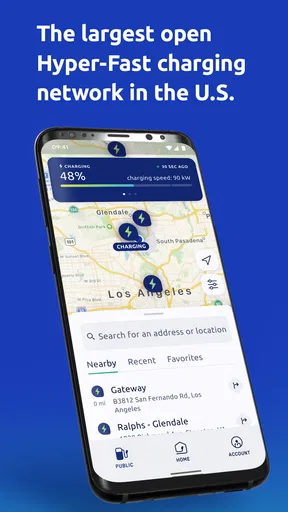
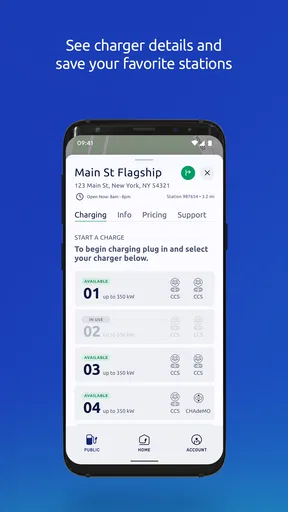
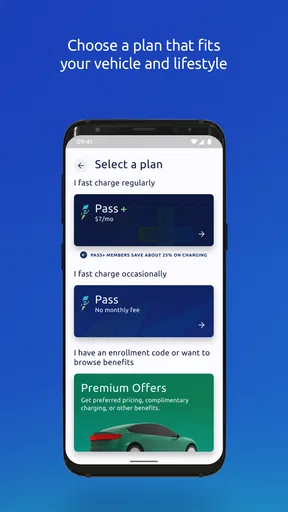
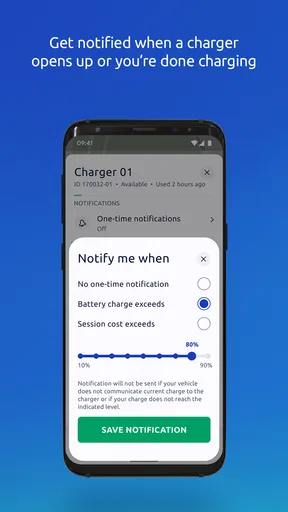
 Analysis by AppCompare
When I’m planning a drive in an electric vehicle, the first question is practical: where can I charge without turning a simple trip into a detour? That is the problem I’d use Electrify America to solve. It is a free Maps & Navigation app from Electrify America LLC, built around finding and using public fast-charging locations. The network has more than 500 stations, so the app is most useful when its coverage fits the route I actually take—not as a promise that every destination or neighborhood will have a convenient stop.
Start with the route, not just the nearest pin
I would begin by checking the map before leaving, then think about whether a listed station is a sensible stop for the whole trip. The closest marker is not always the best choice: a slightly farther location may fit a meal break, shopping errand, or planned rest stop better. That small bit of planning can prevent charging from becoming a separate chore. I’d also check the map again near departure, since station availability can change while I’m getting ready.
That approach matters most on unfamiliar roads. A driver who already knows the local charging options may open the app only when needed, while someone heading out of town benefits from checking the route early and identifying a practical backup. I wouldn’t treat any single map view as a guarantee that a charger will be free when I arrive; a live status is helpful, but the real-world situation can change during the drive.
From finding a station to finishing a stop
One of the first things I noticed about the Electrify America app is its user-friendly interface. From the moment you open it, everything is laid out in a way that just makes sense. No more fumbling around trying to figure out where to go next—this app guides you every step of the way.
The map feature is incredibly detailed and shows all the available charging stations in your vicinity. What’s even cooler is that the app updates in real-time, so you can see exactly which stations are occupied and which are free. It's like having a personal assistant for your EV!
In an ordinary day, I can imagine checking for a nearby stop while running errands, choosing a location that doesn’t pull me far from the places I already need to visit, and then using the session information to decide whether to stay or move on with my day. That is a more useful way to think about the app than simply searching for the nearest charger: it helps connect the driving decision, the stop, and the return to the rest of the schedule.
Payments, session checks, and useful handoffs
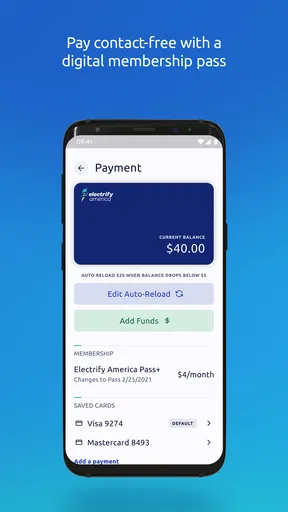
So, what sets Electrify America apart from other charging apps? For starters, the app offers seamless payment options. You can easily add your credit card, and the app saves your information securely, making future transactions a breeze. Plus, they’ve incorporated a rewards system—charge more, earn more. Simple and efficient!
Worth Reading Before You Choose

EA SPORTS FC Mobile 26 Is a Bigger Football Game, but It Takes Time

Flipboard Shows What News Apps Must Do Beyond the Feed

Switching to Android Auto Means Rethinking Your Driving Routine

Google Calendar Makes a Crowded Week Easier to Manage

Ludo King Makes the Most of the Minutes Between Plans

Baby Panda World Brings Quick Play to Modern Phones, but Its Game Library Feels Busy
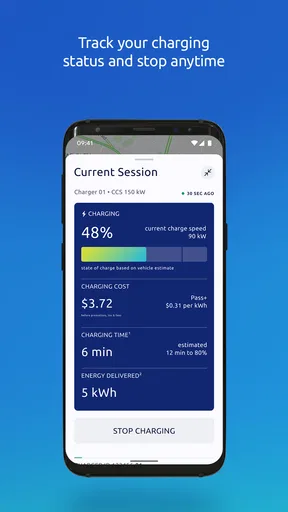
Another feature I love is the charging session tracking. You can monitor your charging in real-time and get notifications when your car is good to go. It’s perfect for those days when you’re running errands and need to know exactly when your car will be ready.
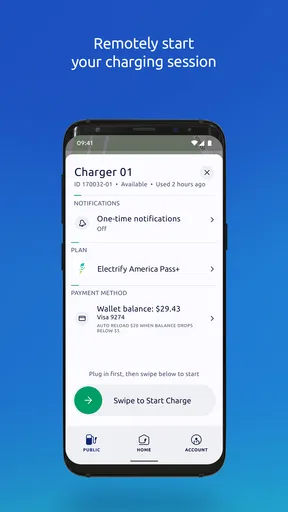
The handoff between the app and the physical charger is where I’d stay attentive. The phone can help locate a stop and keep me informed about a session, but I still need to follow what the charger and vehicle show in person. If I’m relying on a notification, I’d keep the phone available and check the session rather than assuming I can ignore the stop entirely. That is especially sensible when timing matters, because a notification is useful for planning but does not remove the need to manage the actual charging visit.
For a smoother first visit, I’d set up payment before I’m standing beside a charger and trying to get back on the road. I’d also make sure I know how to return to the session screen after stepping away. Those are small workflow choices, but they reduce the chance of fumbling with an account or searching through the app while the car is parked at the station.
How it fits alongside other navigation tools
Compared with a general maps app, Electrify America has a narrower job: it focuses on its own public fast-charging network rather than serving as an all-purpose route planner. That focus can be an advantage when I want to inspect Electrify America locations and manage a charging session in one place. A general navigation app may be more convenient for the full drive, nearby shops, and non-charging stops, while another charging-network app may be a better choice if its stations are more convenient for my route.
I’d use these tools together rather than expect one to replace everything. A broad map helps me understand the overall journey; this app helps me make decisions about an Electrify America stop. If I routinely travel through areas where other networks dominate, relying on this app alone would be a poor fit. If its stations line up with my regular routes, keeping it available gives me a direct way to check that network without searching from scratch each time.
What works well—and where the flow can break
Electrify America has an average rating of 4.6 from around 21,000 ratings, and it has been installed more than 500,000 times. Those figures suggest that many drivers have found a reason to keep it on their phones, but they don’t tell me whether a particular station will suit my trip. I’d judge the app by whether its locations, live information, payment flow, and session tools are useful on the routes I actually drive.
The most important limitation is the network-dependent nature of the experience. An app can make station discovery easier, but its value falls if the locations are inconvenient for my journey or if I need to compare several charging networks. Live occupancy information can help me choose, yet I would still leave room for a change of plan instead of scheduling a tight arrival around a single available charger. For a long trip, checking alternatives before setting out is a sensible habit, not a sign that the app has failed.
I’d recommend it most to EV drivers who often pass Electrify America stations, want a dedicated way to find them, and appreciate seeing charging-session information on their phone. Someone who charges mainly at home and rarely uses public fast charging may not need to open it often. A driver whose routes depend on a different network should prioritize that provider’s app and use this one only when an Electrify America stop makes sense.
Who should keep it, and what to expect
The app is free, carries an Everyone age rating, and was released on May 22, 2019. Its current version is 7.34.0, and it requires Android 8.0 or later. I’d consider those details before installing, particularly if I use an older Android phone. The product is a focused utility rather than a complete EV travel system, so the best expectation is help with this network’s station-finding and charging workflow—not a substitute for every navigation or trip-planning tool.
Electrify America doesn’t just stop at providing an app; they’ve built a community. There’s a section where you can read tips from other users or contribute your own experiences. It’s like a mini forum right at your fingertips. And if you ever run into issues, their customer support is just a tap away. I’ve reached out a couple of times, and they’ve always been quick to respond and super helpful.
For a new EV driver, that community and support can make the first public-charging visits feel less unfamiliar. I’d still treat other drivers’ advice as context rather than a guarantee: a tip that worked for one person may not match my vehicle, timing, or station visit. When something does go wrong, having a support route inside the app is useful, but I’d avoid building a schedule that leaves no time to handle a delay.
A practical choice for the right routes
In a world where electric vehicles are becoming more mainstream, having a reliable charging app is essential. Electrify America is more than just a tool; it’s a companion for every EV driver. With its intuitive design, robust features, and strong community support, it’s hard not to love what they’re offering.
Whether you’re a seasoned EV driver or just starting out, this app is a must-have. It takes the stress out of finding and using charging stations, leaving you more time to enjoy the journey. So, if you haven’t already, give Electrify America a spin. Trust me, once you do, you won’t know how you managed without it!
My recommendation is a little more specific: install it if Electrify America locations are relevant to your regular driving, and use it as one part of a charging plan rather than the whole plan. Check the route before departure, choose stops that fit your day, and keep a backup in mind when arriving with little time or charge to spare. In that role, it can make a public fast-charging stop easier to manage. If its network does not match where you drive, another provider’s app or a general navigation tool will be more useful.
Pros
- Wide network coverage across the U.S.
- Fast charging speeds up to 350 kW.
- User-friendly interface and navigation.
- Real-time charger availability updates.
- Various payment options available.
Cons
- Limited support in rural areas.
- Occasional app crashes reported.
- Higher prices compared to competitors.
- Inconsistent charging speeds at times.
- Membership required for best rates.
FAQs for Electrify America
What is Electrify America and how does it work?
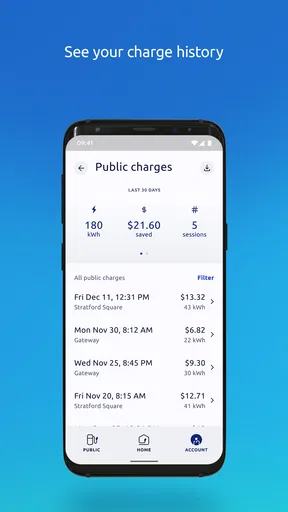
Electrify America is a network of electric vehicle (EV) charging stations across the United States, designed to facilitate convenient and rapid charging for EV owners. The app helps users locate nearby charging stations, initiate charging sessions, and monitor charging progress in real-time. Users can also manage their accounts and view charging history directly through the app.
Is the Electrify America app compatible with all electric vehicles?
Yes, the Electrify America app is designed to be compatible with a wide range of electric vehicles. It supports most EV models available in the market, providing access to both DC fast charging and Level 2 charging stations. However, it's always a good idea to check if your specific EV model is supported by the charging network.
How do I pay for charging sessions with Electrify America?
Users can pay for charging sessions directly through the Electrify America app. The app offers a variety of payment methods, including credit and debit cards. Additionally, Electrify America provides membership plans that offer reduced rates for frequent users. All transactions are securely processed, and users can easily access their billing history in the app.
What are the main features of the Electrify America app?
The Electrify America app offers several key features, including a station locator, real-time charging status updates, and notifications. It allows users to filter stations by charger type, view pricing, and access 24/7 customer support. The app also integrates with navigation apps for seamless route planning to charging stations.
Are there any additional costs or fees associated with using Electrify America?
In addition to the cost of the electricity used during charging, there may be idle fees if a vehicle remains plugged in after reaching full charge. These fees are designed to encourage users to free up charging spots for others. Users should review the pricing details in the app for complete transparency on costs and potential additional fees.


